Online electrical panel designer
Build the panel. Check before installation.
Free, in your browser, nothing to install. 100+ automatic checks against IEC 60364 while you design the panel.
Create a panel for freeMy panels- Works in browser
- Cloud storage
- Export PDF · .eboard
Demo panel check:1 safety error0 problems1 recommendation
Example of an error explainedOnline electrical panel check
Errors show up before installation.
Demo panel / 02 rails
Safety error
«RCD rooms» — closed N-loop on «Neutral busbar»
What was found
Device both draws N from «Neutral busbar» and feeds N back into it. Remove the binding on one of the owners via Disconnect in device properties.
Demo panel detail · constructor render
Inside the electrical panel designer
From an empty rail to a finished project.
Five steps in the real editor, on the “Apartment” demo panel: two DIN rails, an incoming breaker, a voltage relay, an SPD, two RCDs, nine circuits and three combs, a TN-C-S earthing system and checks to IEC 60364.
ElectroBoard/ Demo project
Interactive tour
- 01Empty panelDIN rails, the N neutral bar and the PE earth bar.
- 02Add devicesBreakers and RCDs from the catalog snap onto the rail.
- 03ConnectThe editor routes the wires between devices by itself.
- 04CheckErrors, issues and recommendations — right above the panel.
- 05Export PDFEquipment specification, drawings, installation and labels — ready to print.


03 / 05Automatic wiring
Screenshots of the real editor.
Features
From the first module to a single-line diagram and PDF.
Design
Visual DIN rail editor
Drag devices from the palette onto the rail — with search, favorites and recents. Works on a computer, tablet and phone.
- DIN rail
- Desktop · tablet · phone
29 types of modular devices
Protection, switching, monitoring relays, metering, power supplies: MCBs, RCDs, RCBOs, SPDs, AFDDs, fuses, contactors, ATS, 1-0-2 changeover switches, meters.
- MCB
- RCD
- RCBO
- SPD
- AFDD
- ATS
Busbars and combs
N neutral bars, PE earth bars and phase busbars, combs with a rating and a supply cable. The editor itself flags overloaded busbar terminals.
- N · PE
- combs
- terminals
Automatic wiring
Wires route themselves: around the busbars, with no crossings. There is a manual mode, W wire numbering and a potentials panel.
- auto-routing
- W numbers
Multiple power sources
Mains, generator, inverter, UPS, solar panels and a battery; ATS and changeover switches, supply to individual poles.
- ATS
- generator
- inverter
Panel templates
Start from a ready-made apartment or house panel instead of an empty rail, and adapt it to your site.
- apartment
- house
Checks
100+ automatic checks
MCB selectivity, overload, cable cross-section, phase balance, neutral, combs and busbars — the error shows up at once, with an explanation.
- selectivity
- phase balance
- neutral
Required protection
30 mA RCDs on socket circuits, the RCD type for loads with a DC component, RCD selectivity; for wet areas and bedrooms — once a room zone is set.
- RCD 30 mA
- AFDD
- wet zones
Standards regime
Choose the panel's standards regime in the settings. Checks and clause references follow the chosen regime — for IEC, that is IEC 60364.
- IEC 60364
5 earthing systems
TN-S, TN-C, TN-C-S, TT and IT earthing systems: an RCD in a TN-C network is an error, and so is a missing RCD in TT or IT.
- TN-S
- TN-C
- TN-C-S
- TT
- IT
Calculations
Short-circuit currents
Prospective short-circuit current, phase-neutral loop impedance, MCB breaking capacity and the disconnection condition in TN and TT — in the short-circuit panel.
- Ik
- Zs
- Icu
- TN · TT
Cables: cross-section and protection
Current-carrying capacity and recommended cross-section, voltage drop, thermal withstand, correction factors for grouping and temperature.
- ΔU
- k²S²
- grouping
Loads and phase balance
MCB and phase currents, panel totals, diversity factor, supply capacity margin and motor starting current.
- phase currents
- diversity
- supply
Documents
Project PDF
Panel drawing, wiring diagram with wire numbers, connection list, DIN rail labels and the specification — through the browser's print dialog.
- drawing
- connections
- labels
- specification
Single-line diagram
A separate page with the panel's schematic, which you can print on its own.
- EPS
Specification in Excel
Devices, cables, busbars, combs and totals in XLSX or CSV files — with supplier, price and status columns.
- XLSX
- CSV
Public link
Share the panel by link: a colleague or client sees the diagram and downloads the PDF without signing up.
- no sign-up
Help
AI consultant
Sees your current panel, searches IEC 60364 for the answer and links to the specific clauses.
- IEC 60364
- IEC
IEC reference
28 sections of IEC standards — with search and links to the clause.
- search
- links
Cloud and .eboard file
Once you sign in, projects are saved to the cloud automatically; a copy in an .eboard file is for archiving or handing over.
- autosave
- .eboard
How it works
Three actions. One project.
Build the panel, check the connections and save the result.
Build
Add devices and connect them.
Demo / moving
Drag a breaker to a free slot — or select it and press ← →.
Check
Find the cause and fix it in the project.
Check result for the demo rail
3 safety errors
Breaking capacity is below the short-circuit current (6000 A < 6300 A)
1 problem
«RCD rooms» protects nothing
2 recommendations
No one has checked the cable cross-section «N (RCD rooms)»
Export
Save the diagram and materials.
Demo panel PDF “Apartment”
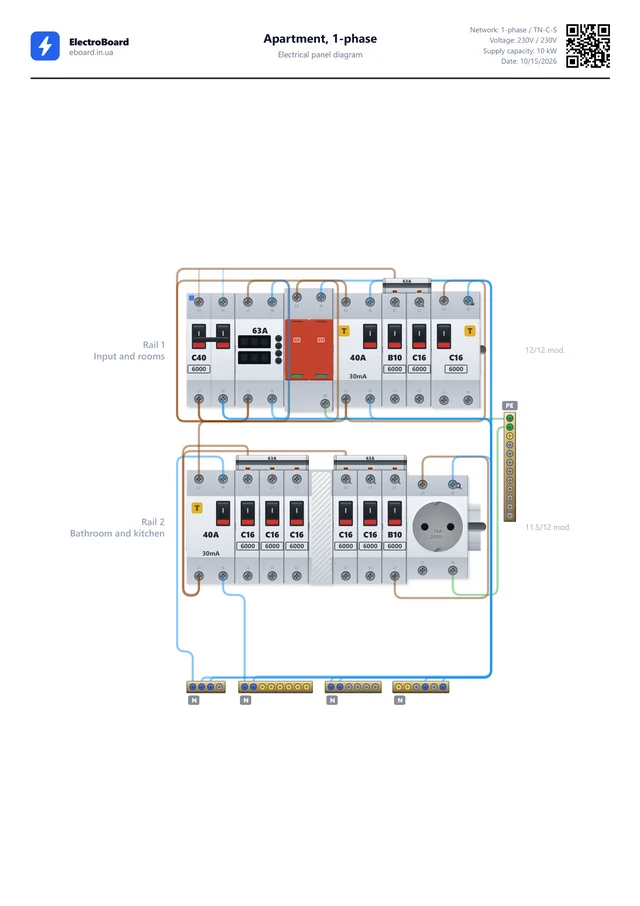
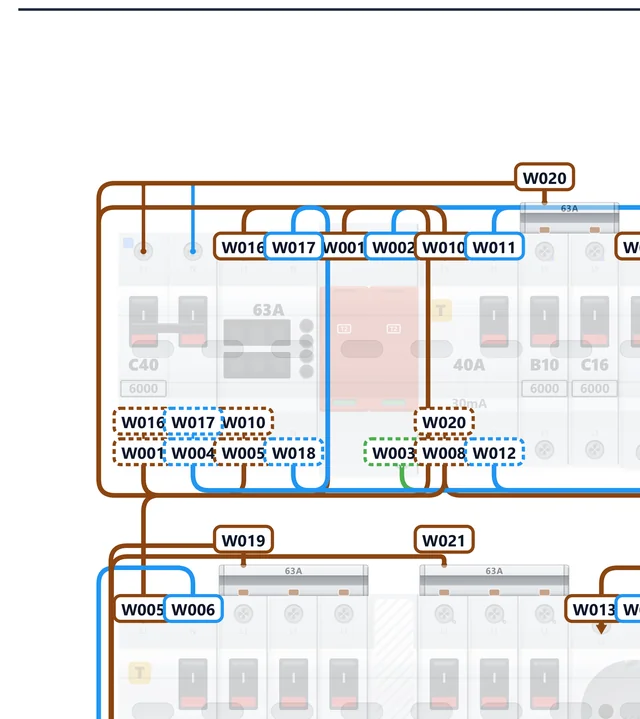
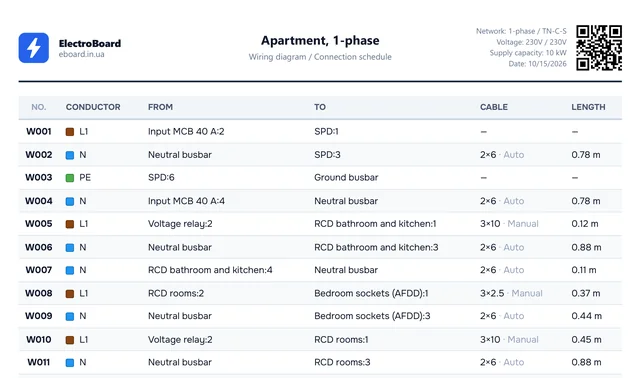
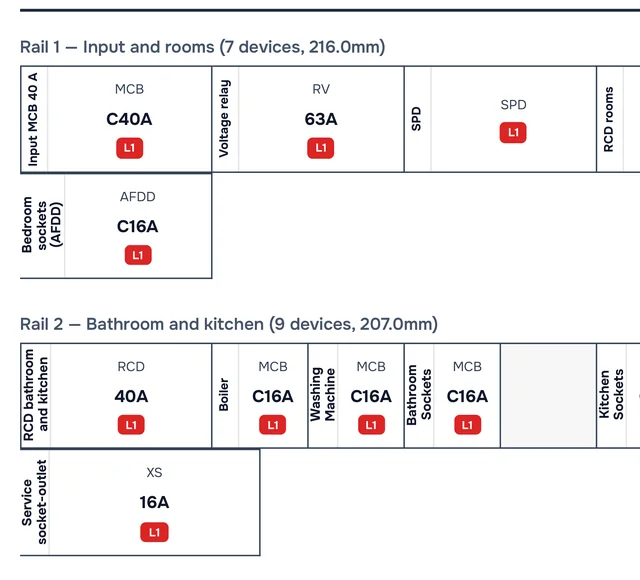
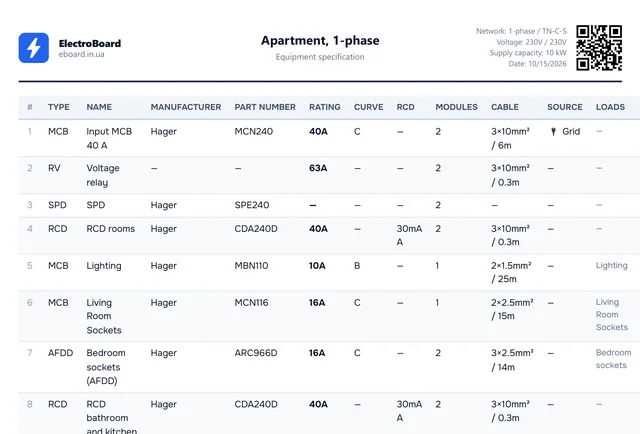
Panel diagram · wiring diagram · connection list · labels · specification


Your next step is in the constructor.
Continue in the constructorTools
8 free calculators.
- Cable cross-section calculationCable cross-section selection by power, current and installation method per the app's reference table.
- MCB selection by loadBreaker rating and trip curve selection (B/C/D) with coordination and selectivity check.
- Phase load balancingConsumer distribution across phases L1/L2/L3 to minimize imbalance in a three-phase grid.
- House power calculatorTotal load calculation by appliance list. Recommendations for incoming MCB, cable and connection type (1ph/3ph).
- Illuminance calculatorLamp count calculation per EN 12464-1. Floor area, room type, ceiling height, lamp type.
- Converter W ↔ A ↔ VConvert watts to amps for 1ph, 3ph and DC grids. Cos φ, recommended MCB and cable cross-section.
- Electricity CostDaily and monthly electricity cost calculation. Appliance list, tariff, top consumers and saving tips.
- Sticker Generator for PanelCreate and print labels for MCBs, RCDs, RCBOs. Multiple rails, phase colors, exact DIN size. Logo and QR code when printing.
Questions and answers
Before the first module.
Can I design an electrical panel online for free?
Yes. ElectroBoard is free: open the constructor without an account, create your first panel in the browser and check it as you design. An account is needed to save a panel to the cloud and share it. The calculators and reference pages work without signing in.
How do I design an electrical panel online without installing software?
ElectroBoard runs right in your browser — Chrome, Firefox, Safari, Edge. Pick an earthing system and object type, then drag breakers, RCDs and RCBOs onto the DIN rail. It automatically computes phase currents, runs 100+ checks and generates a PDF with the diagram and bill of materials. You can also install it as a PWA on your phone or computer for offline use.
Who is this tool for?
For electricians, designers and students — anyone who needs to design an electrical panel to IEC 60364.
Does ElectroBoard follow IEC 60364?
ElectroBoard runs 100+ checks against IEC 60364 and IEC 61439-1: protection selectivity, cable ampacity, earthing systems, room zones, N-routing, hard invariants (PEN, TT/IT, N isolation between RCDs), terminal overload and supply-source roles — including short-circuit protection on the source side. It is a design tool, not a substitute for official documentation.
Can I export the result?
Yes — a PDF with the panel diagram, a bill of materials, and a .eboard file to hand over to colleagues. You can also share the panel via a link.
How do I calculate voltage drop in a cable?
The basic single-phase formula is ΔU = (2 · I · L · ρ) / S, where I is load current, L is line length, ρ is resistivity (copper ≈ 0.0225 at 70 °C) and S is conductor cross-section. IEC 60364 keeps total voltage drop within roughly 4% (lighting) to 5% (other circuits) from the panel to the farthest load. Instead of calculating by hand, use the online calculators — enter cross-section, length and cable type to get the drop in volts and percent.
How do I draw a single-line diagram of an electrical panel online?
No need to draw by hand: build the panel on a DIN rail and the constructor produces the diagram itself. In the “Export” menu, “EPS diagram” opens the panel's schematic and “PDF panel” saves the diagram together with the bill of materials.
Are my projects stored in the cloud?
Yes. Once you sign in, projects are saved in the cloud and available from any device. You can also save a copy of the panel to an .eboard file.
Does the check replace a specialist's work?
No. This is a design tool: it finds common mistakes, but it does not replace the project documentation or a check by a qualified electrician.
Build your first panel.Continue your project.
From the first module to a finished project.All your panels are in the constructor.
Works in browser